Apr 27, 2010

Shadow blur with PCF and Gaussian filter

Long time back, GPU Gems introduced how to soften shadow with Percentage Closer Filter: http://http.developer.nvidia.com/GPUGems/gpugems_ch11.html

The article fetches eight times and get a similar result to sixteen times fetching.

I have tried both ways but I wasn't satisfied with them.

As the article explains the problem on the shadow map is that we needs to get binary depth testing results first. We cannot just blur the shadow depth values.

To get a correct Gaussian blur result, we first need to get sixteen texels from the shadow map. Then we compare those values with the actual depth value. Now we need to use Gaussian blur on those binary testing results.

The article on the GPU Gems just takes the average on them, but the quality can be much more improved with Gaussian blur and/or Bilinear filter.

We can use a 3x3 Gaussian mask on 4x4 texels. Thus we will get four boolean values. Then we can take bilinear filter on them.

To improve the result even further, we can calculate floating values from the depth testing, rather than just boolean values.
float depthOffset = 0.001;

float depth00 = GetDepth( uv + float2( -1.5, -1.5 ) );

float brightness00 = saturate( ( depth00 - ( actualDepth - depthOffset ) ) / ( 2* depthOffset ) );

// do the same thing on different offsets.
This approach is trying to estimate how much the pixel is open to the light; I tried to apply SSAO trick on the shadow map, but in a simpler way.

The result was looking good, but I am still looking for a better way, because sixteen texel fetching seems too expensive.

One way to improve the performance can be to fetch half or quarter of them and fetch others only when those depth testing results differ.

Apr 25, 2010

Why does light leak happen on the soft shadow map?

Today I have arrived at certain conclusion about soft shadow map technique. I am trying to describe it now.

Variance shadow map (or VSM) Convolution shadow map (or CSM) and Exponential shadow map (or ESM) all have light leaking problem. On papers of VSM this problem is referred as "light bleeding". Here I assume "light bleeding" and "light leaking" are the same problem.
The light leaking artifact is actually the source of softness of the shadow. What I am proposing here to solve the light leaking problem is to differentiate inner penumbra region from outer penumbra region; I will explain more latter.

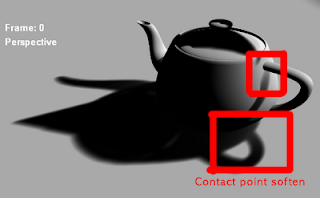
A screen shot of Exponential shadow map is below:The screen shot was referred as "no bleeding", but the fact is it is still bleeding and it has physically wrong softness on the contact points.The shadow around the contact points is supposed to be sharp because they are affected by high frequency light most. The contact point soften problem is actually a little bit different version of the light leaking problem. For example, if we put two pieces of papers very closely, the second paper which is supposed to be under shadow will get soften shadow due to the short distance.

First the reason why we have light leaking problem on shadow map retrieving methods is that we are trying to estimate information of places under the shadow map while the shadow map hold non of information of them.

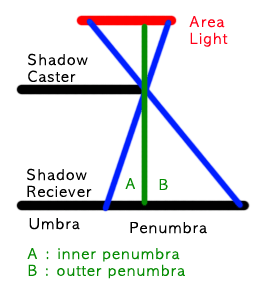
There can be two types of penumbra region with respect to the shadow map. I call them inner penumbra and outer penumbra. Inner penumbra is penumbra region that is not visible from shadow map. Outer penumbra is penumbra region that is visible from shadow map.Whenever we attempt to soften "inner penumbra" region, we are using estimated values. It is because the shadow map doesn't see the inner penumbra part so that there is no information on the shadow map. The way to estimate the information behind the shadow map is causing the light leaking problem.

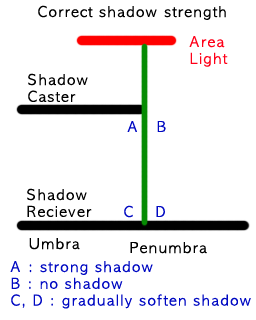
A physically correct shadow strength calculation should be like this:Note that we must differentiate "B and D" from "A and C". It is because B part gets full of light while A part doesn't get any. If we use the same calculation on inner penumbra region( A and C ) and outer penumbra region ( B and D ), the result must be wrong.

The problem is on "A and C" part with VSM and ESP.

The calculation of VSM is like this:
float bOuterPenumbra = ( depthOnShadowMap >= actualDepth );

float brightness = variance / ( variance + pow( actualDepth - depthOnShadowMap, 2 ) );

float finalBrightness = max( bOuterPenumbra, brightness );
This will make "A" part brighter than "C" part, which is opposite to the correct shadow model. This will make stronger shadow on "C" part and softer shadow on "A".

Note that VSM does not count the outer penumbra region into the calculation. In order words VSM is working with inner penumbra region not with outer penumbra region.

ESM does the smiliar calculation way of VSM. It reduced light leaking problem but now it causes contact point soften problem. It is because ESM considers depth values only regardless how much the depth values are interpolated. By this reason, the light leaking problem is moved from "C" part to "A" part so that it appears to be soften contact points.

To address this light leaking problem, we need to give the softness on the outer penumbra rather than the inner penumbra. With respect to the fact that the shadow map holds no information of inner penumbra region, it makes more sense to apply shadow softening on the outer penumbra region.

The calculation will be like this:
const float e = 2.71828183;
const expConst = -5.0;

const bool bUnderShadow = ( actualDepth > depthOnShadowMap );

const float brightness = ( bUnderShadow ? 0.0 : ( 1 - saturate( pow( e, expConst * actualDepth ) / pow( e, expConst * expFromExpMap ) ) ) );
There are some problems on this approach.

One of them is that we cannot use "second depth rendering" trick on shadow map rendering phase. Second depth rendering is to render back face on the shadow map rather than front face. It is very helpful to reduce the shadow swimming problem and "surface acne" problem. Since the softness calculation relies on the front face depth, we can no longer use second depth rendering.

Another problem is that we must hold the original shadow map in order to differentiate inner penumbra and outer penumbra. When we want to pre-filter the shadow map as ESM does, we need to fetch texels on both.

I have some of solutions in my mind and I will post more details after I get enough test results.

Apr 23, 2010

Soft shadow with shadow map...

There were several new innovative shadow map techniques that promised soft shadow. There are Variance shadow map, and Exponential shadow map.

They are using 32bit floating point surfaces and they assumes they work with linear hardware filter. Unfortunately PlayStation3 does not support linear nor bilinear filter for 32bit floating point surface. How am I supposed to get soft shadow?My final choice was a little bit modified version of Percentage Closer Filter, which means I fall back to the bottom line. I modified it to mimic the bilinear filter.

I am not quite happy because I cannot get any benefits from new hardware accelerations. But it seems to work fairly good.

*PS: The screenshot it from here.

Apr 20, 2010

Depth buffer blur with Gaussian filter on PS3

These days I often look at the real shadows of trees or any objects. Strangely they don't look natural or real for me. It makes me thinking of what kind of soft shadow I want to see.

The softness of shadows is from frequency of light. Around edges the shadow looks sharp, because it is resulted from high frequency. Some of soft shadows are from low light frequency.When we render a shadow map, it is analogous to the HIGH frequency light. It is proper to the shadows close to the object but improper to the shadow far from the object.

We need LOW frequency shadow map for distance shadows. Low frequency shadow map can be retrieved by Gaussian blur. The blurred shadow map must have the same resolution to the original shadow map.

One problem here is again how to blur the shadow buffer which contains encoded values.

Simplest way is to sample nine times and calculate Gaussian blur, but this way will be too slow.

I have already described how to get blurred depth buffer with linear filter before: http://wrice.blogspot.com/2010/04/blurring-depth-buffer-with-linear.html

Today I found that I can also do this with the Gaussian filter on PS3. The trick is very similar to the one with linear filter, but it needs more buffer bits on each channel. And this is not for down sampling but only for blur.

The Gaussian filter on PS3 does "[ 1, 2, 1 ] [ 2, 4, 2 ] [ 1, 2, 1 ] / 16".
Since it divides by 16 ( =2^4 ), we need to have 4 bits as buffer on each color channel.

It means that we can use 4bits on Red channel, 4 bits on Blue channel, 4 bits on Green channel, and 8 bits on Alpha channel. Therefore, we can use total 20bits, which is large enough.

The way to use those shadow maps is to sample on the non-blurred shadow map first and sample one more time on the most blurred shadow map. The difference value between those two sampled values will represent how much the shadow needs to be blurred.

Apr 19, 2010

From gran turismo 5 movie clips

Today I was looking closer to Gran Turismo 5 movie clip.

I found that they are using two types of shadows of cars. One is from directional light and another is ambient occlusion.

The shadow from the directional light is done by shadow map. Each car seems to hold their own shadow map.
As you can see from the screen shot above, those two types of shadows don't seem to get along well.

An impressive part is reflections on the car's body. The reflection looks very clear and covers body and glasses part very nicely. I guess they are stream in and out pre-baked environment map rather than rendering them at run-time.

I will be very surprised if the environment map is rendered at run-time. One way to figure out is to see whether other cars are reflected on the car's body or not. I couldn't find that kind of situations from the movie clip but I can test it latter.I tried to see aliasing issues but the movie clip did not carry enough details on edges. HDR was covering edge parts smoothly and Depth of Filed made the look smoother. Slightly shaking camera up and down made the scene more realistic.